Case study · Software

MedLab Demo 2026

A nine-screen analytics product, a 25-slide deck and a clickable prototype — from a single meeting transcript to the conference floor in seven days. Figma Agents did the execution. The governed design system did the governing.

The situation

A national pharmacy benefit manager needed a demo-ready analytics product for its GLP-1 Benefit 360 program in time for the MedLab ’26 industry conference. The brief landed seven days before launch.

The product had to tell one coherent story to a live audience: population-level GLP-1 spend and utilisation, a clear path into two clinical programs, and a member-level view clinical teams could act on — all inside the client’s real brand system, backed by a defensible cost-and-outcomes narrative.

The starting material was a recorded internal working session. One transcript. No requirements document, no wireframes, no approved direction.

Seven days before a conference is normally the window where discovery gets cut, not expanded. This project did the opposite — it ran a full discovery and design arc inside that week, because the execution speed came from somewhere other than hours.
7 days
transcript to conference-ready, start to finish
9
screens designed, wireframe through final build
35
artifacts produced en route to two deliverables
5 roles
researcher, IA, prototyper, visual designer, documentarian
3
formal review and findings rounds, all documented
From wireframe to the conference floor

The same screen at two ends of the week. Structure was decided by hand before anything was generated; the final build came out of the governed component library with the brand audit already applied.

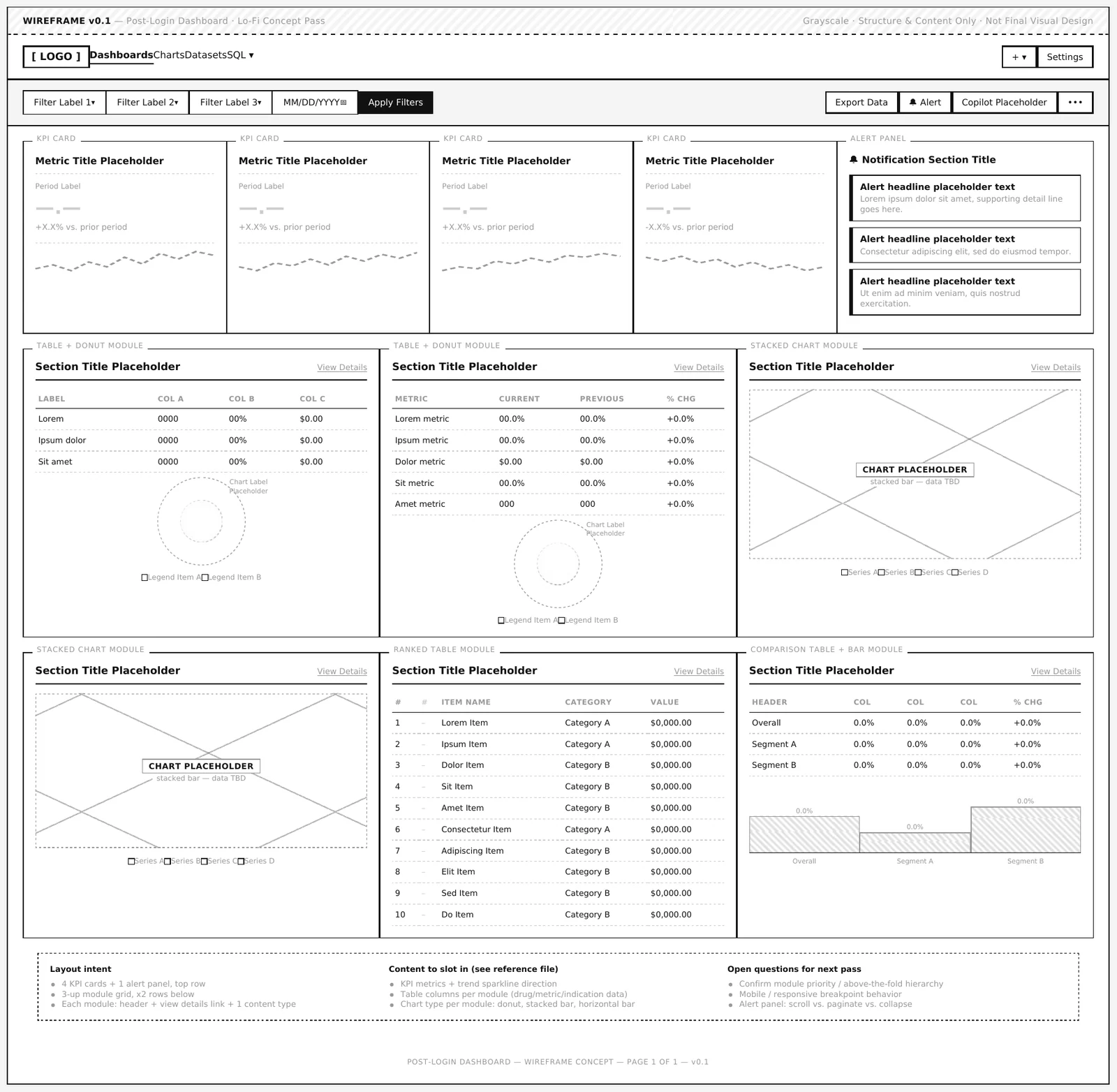
Lo-fi wireframe of the post-login dashboard: grayscale layout showing a filter bar, four KPI cards with an alert panel, and a six-module grid, annotated with layout intent and open questions.
Stage 02Lo-fi wireframe, drawn by hand in Figma against the existing component library. Grayscale, placeholder content, real structure — with layout intent and the open questions for the next pass written directly on the page.
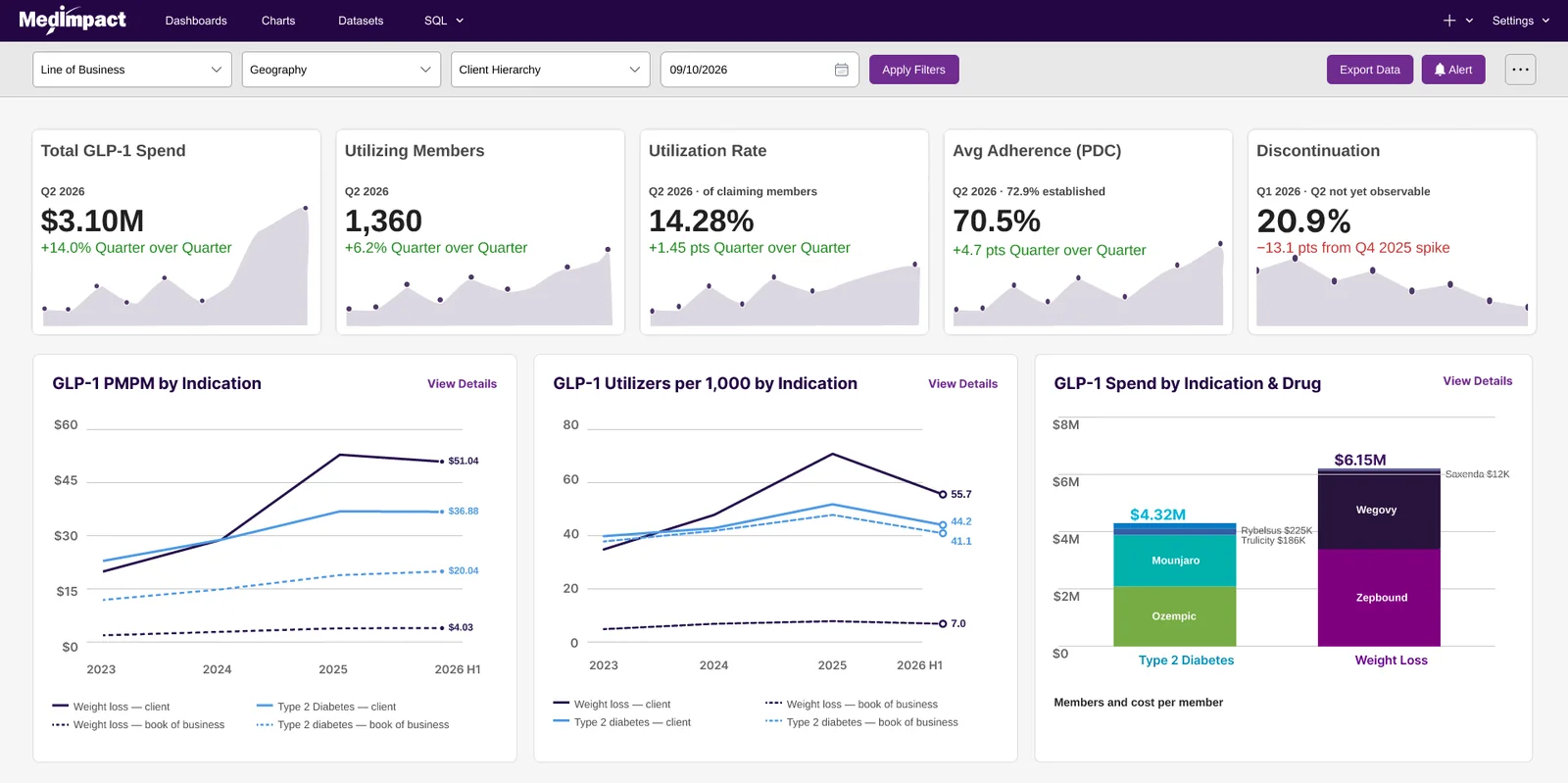
Final GLP-1 dashboard: five KPI cards showing total spend, utilising members, utilisation rate, average adherence and discontinuation, above three charts covering PMPM by indication, utilisers per thousand, and spend by indication and drug.
ShippedThe approved main dashboard used live at the conference. Five KPIs with quarter-over-quarter deltas, then population-level trend and spend breakdowns — every color token, component and label traceable to a specific requirement or finding produced earlier in the week.

Figma Agents, not Figma Make

Most “AI in Figma” conversations are about prompt-to-webpage generation. That is a different tool for a different job, and knowing the difference is what made this timeline survive contact with an enterprise design system.

The wireframe was drawn by hand

Directly in Figma, from the existing component library. Placeholder components, real structure, no visual polish — plus a parallel content-free zoning pass across all nine screens, restoring the wireframe-before-comp discipline the project had initially skipped.

Structure is a judgment call, not a generation task.

Agents took it to high fidelity

Once the wireframe was validated, Figma Agents generated and iterated multiple full-fidelity interactive versions from the governed component library — real components and tokens, not freehand AI UI. Stakeholders reacted to several genuine options within hours instead of weeks.

Fast and shippable, not fast and disposable.

Why Make would have failed here

Figma Make starts from a prompt and builds something new — typically a standalone page with no connection to an organisation’s real components, tokens or governance. For an enterprise product with a brand system already in place, Agents is the tool that keeps AI speed compatible with design governance.

The specialty, not the buzzword.

What got produced

Fourteen stages, one continuous working process. This is the deliverable list, not a narrative.

Stage 01

Requirements

Before a single screen. One transcript, parsed into something traceable.

  • User Requirements Document. Stakeholders, scope, page-by-page functional requirements and open risks — each requirement traceable back to the exact moment in the source conversation that produced it, so nothing was an assumption dressed up as somebody else’s decision.
  • Information architecture. The population → program → member drill-down structure across nine screens, held consistently even as scope tripled from one dashboard to a nine-page product.
  • Scope boundaries. Explicit out-of-scope list, including what the product must not imply already exists — a real risk when a demo runs in front of buyers.
Stage 02

Wireframes

Two fidelities, every screen, built in Figma against the real library.

  • Detailed lo-fi wireframes × 9. Annotated structure and placeholder content, one per screen, with layout intent and open questions written on the page.
  • Section-zoning wireframes × 9. Pure layout zoning, content-free, so structure could be argued about without anyone reacting to copy.
  • Mid-fidelity comps × 8. Real GLP-1 content with deliberately flat styling and approximate charts, validating structure before anyone invested in polish.
Stage 03

Review and audit

Three formal rounds, each one written up rather than left in a meeting.

  • Findings v1.0 — post-review update. Reconciled the approved direction against the original requirements, separating what carried forward, what was added, what was removed, and one requirement conflict needing explicit sign-off.
  • Findings v2.0 — brand alignment audit. Every screen checked against the client’s Digital UI Guide: color system, typography, navigation, buttons, alerts, forms, tables, icons and modals. Produced a consolidated action list before the visual pass began.
  • Findings v3.0 — semi-final to final. Closed the two open brand questions and documented both resulting exceptions formally, so they stop being accidents and start being decisions somebody can defend.
  • Brand-corrected mockups × 2. Exact token application, proving the audit’s findings visually rather than describing them.
Stage 04

Audience and users

Two separate sets, because the conference audience is not the eventual user.

  • Conference personas × 3. An economic buyer, a clinical buyer and a sceptical broker — each with the real objections a presenter would have to answer on the spot, at a booth, in two minutes.
  • Composite attendee journey. Five stages from floor to follow-up, isolating exactly where the three personas diverge so presenters know when to adapt mid-conversation.
  • Post-launch personas × 2. An employer-side benefits owner and a health-plan clinical director — the people who would actually log in after launch.
  • Operational journey maps × 2. A monthly review loop and a weekly operational loop, which surfaced two concrete feature gaps neither persona had asked for directly.
Stage 05

Hand-off

The two things that actually went to the conference floor.

  • 25-slide presentation deck. Brand-compliant, built to run alongside the live demo. Its screenshots are the same designs carried through every stage — the approved screens, not a mockup of them. This opened every booth conversation.
  • Clickable interactive prototype. Production-fidelity and navigable, built from the brand-corrected mockups. Every screen, color token and component decision traces back to a specific finding or requirement produced earlier, rather than being designed fresh at the final stage.

Where the human stayed in the loop

AI produced the work. Vetting it against reality was a person’s job, every time. Three catches made it into formal documentation because they had real downstream consequences.

A color that should not have existed

The build used an amber tone for “Medium” risk, but the brand guide’s alert system defines only green, magenta and red. Rather than silently forcing it to match or shrugging past it, the mismatch was logged as a documented brand exception with the clinical reasoning reconstructed.

Unflagged off-palette color becomes an expensive rebrand eighteen months later.

Two brand files, two answers

The brand guide PDF and a separate color reference listed different hex values for the same accent — a one-character difference easy to skim past. It was flagged as an open item requiring confirmation rather than guessed at.

A token typo caught at audit costs five minutes. Caught after six screens, it costs a rebuild.

The drift was real, and it shrank

Early Agents output showed small plausible drift — wrong typeface in a chart header, a color near the palette but not from it, an element built freehand when a governed component already existed. As prompts carried more design-system context, later versions needed noticeably less correction.

Specificity in, governance out.
None of these were dramatic failures. They were small, plausible-looking drift — the kind that ships unnoticed if nobody who actually knows the design system is checking every artifact against it.

What happened at the conference

The deck and the prototype both shipped. Marketing vetted the final build against the brand system and signed it off before the floor opened.

The demo landed. It generated more qualified sales leads from prospective new customers than the team had forecast, and attendee feedback on both the product story and the walkthrough was strongly positive. The deck opened every booth conversation; the clickable prototype carried the hands-on half.

Why that matters more than the speed. A seven-day turnaround is only interesting if the thing that ships survives a brand review and holds up in front of buyers who do this for a living. This one did both.

Figma AgentsFigma prototypingClaudeGoverned design systemBrand compliance auditB2B healthcare analytics
8–14 wk
typical industry timeline for this scope of discovery and design
7 days
actual, against a fixed launch date
~85–90%
compression against that benchmark, order of magnitude
Above plan
qualified leads generated versus forecast
Signed off
by marketing against the brand system before the floor opened

More of the shipped build

The product spans nine screens. Two more of them, past the population view and into a clinical program.

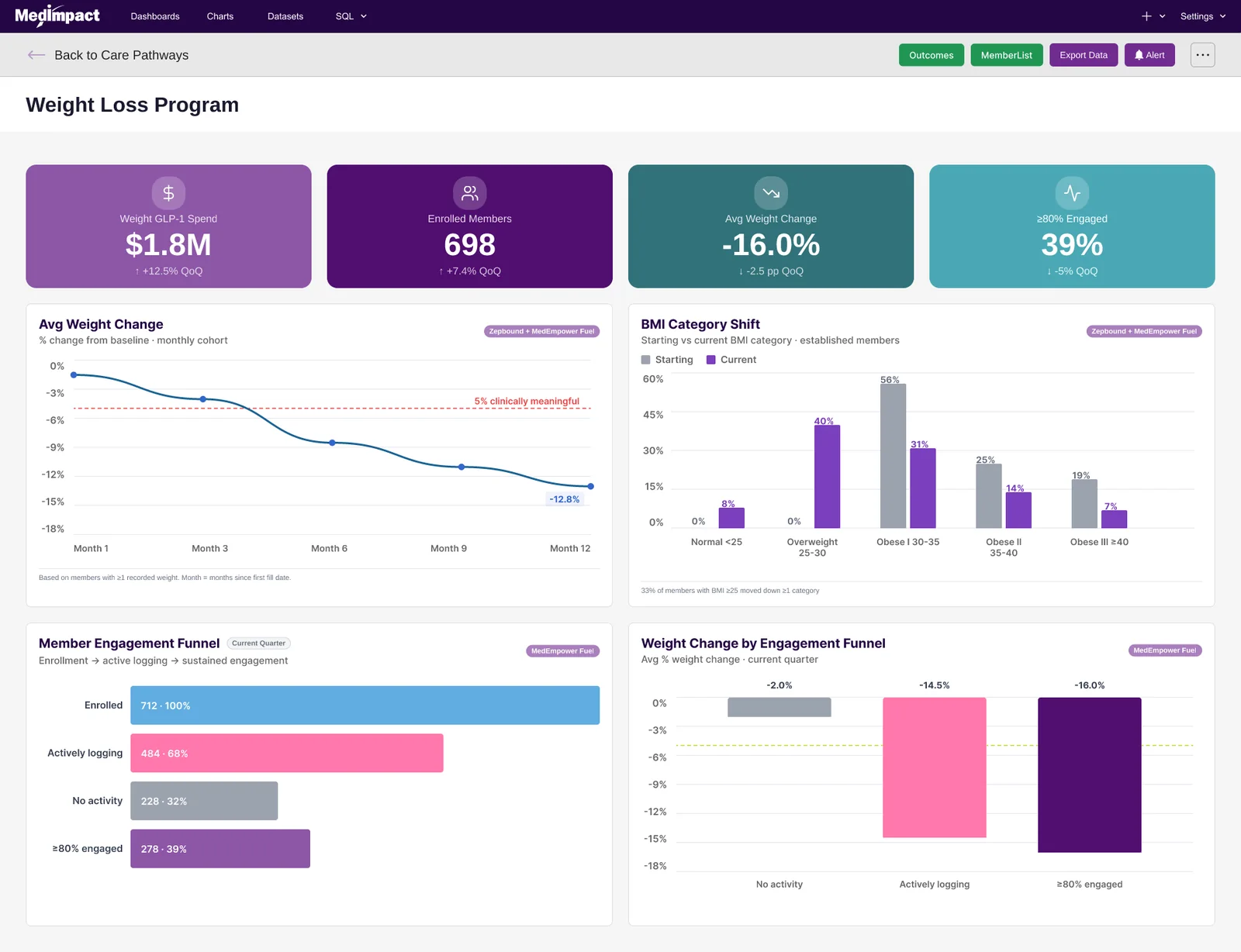
Weight Loss Program dashboard: four KPI cards for spend, enrolled members, average weight change and engagement, above charts for average weight change over twelve months, BMI category shift, a member engagement funnel, and weight change by engagement tier.
ProgramWeight Loss Program dashboard. KPIs, a twelve-month weight-change trend against a clinically meaningful threshold, BMI category shift, and an engagement funnel tied to outcomes — the step between a population signal and a member-level worklist.
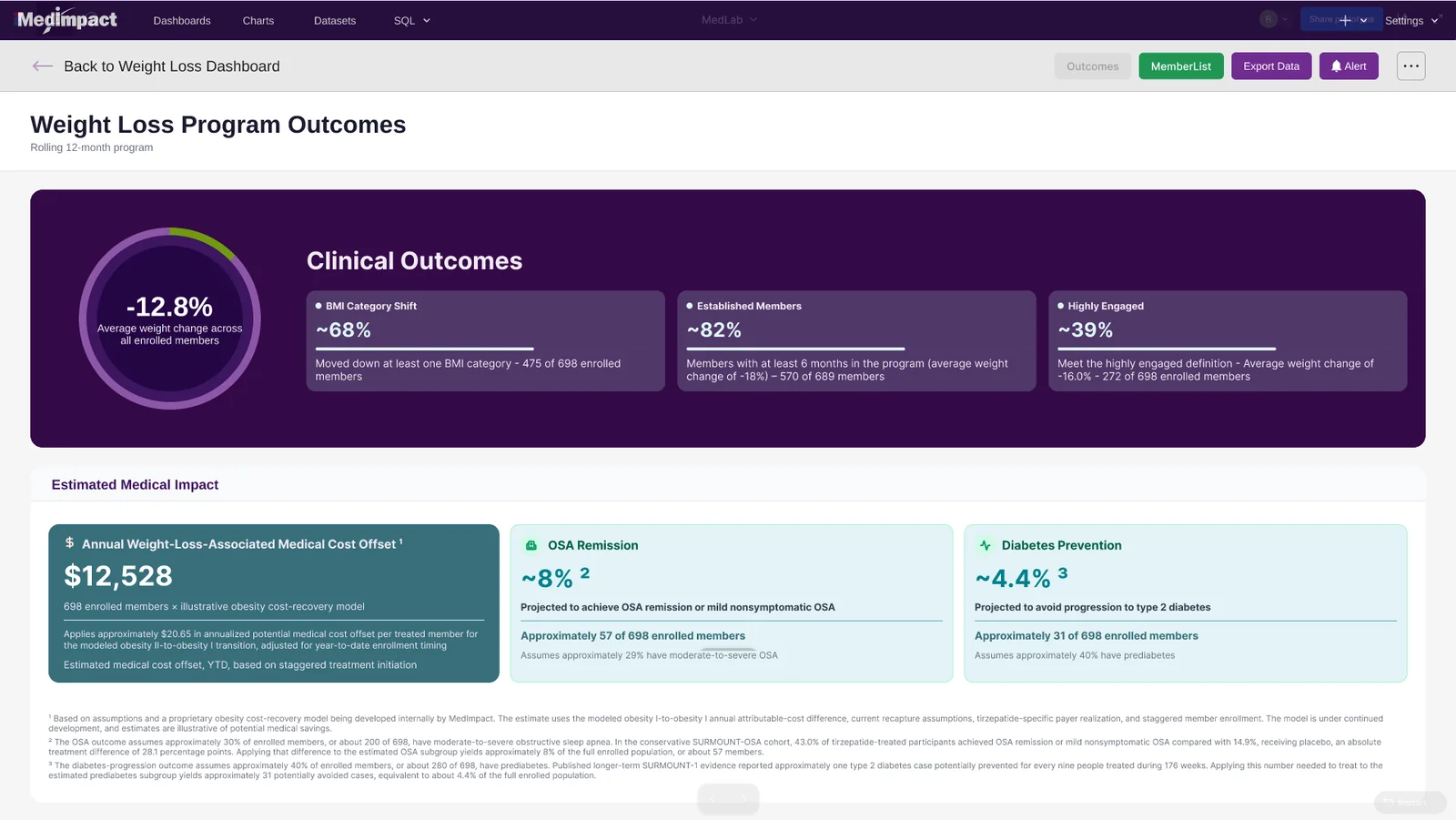
Weight Loss Program Outcomes screen: clinical outcomes panel with average weight change, BMI category shift, established members and engagement rates, followed by an estimated medical impact section covering cost offset, OSA remission and diabetes prevention, each with footnoted assumptions.
OutcomesProgram outcomes and estimated medical impact. The cost-offset and clinical-projection figures each carry visible footnotes describing the model and its assumptions — a requirement set early, so the value story stays illustrative rather than reading as an audited financial claim.

See it

The interactive prototype and the design file behind it.

Interactive prototype

The clickable walkthrough

The production-fidelity, navigable prototype used for the hands-on portion of the demo. Starts at the main dashboard and runs the full population → program → member path.

Open the prototype

Design file

Screens and components

The underlying Figma file — the nine screens, the component usage, and the wireframe-to-final progression the prototype was assembled from.

Open the design file

What this looks like for you

Same method, your product. Three things worth knowing before a compressed timeline starts.

A design system

is the precondition

Agents accelerates work inside a governed component library. Without real components and tokens to build from, AI generates plausible-looking UI with nothing underneath it. If you do not have a system yet, that is the first engagement, not this one.

Every artifact

still gets reviewed

Speed comes from generation. Correctness comes from somebody who knows the system checking each output against it. We do not hand over anything that has not been audited against your own guide.

The paper trail

comes with it

Requirements, findings rounds, documented exceptions. Compressed timelines usually lose the decision record first. Here it was a deliverable, which is why nothing in the final build was a last-minute guess.