Case study · Software

A platform built from building blocks

A multi-year enterprise pharmacy-benefits platform, serving two audiences through one interface. Six levels of hierarchy, benefits assembled from reusable components, and every value showing where it came from. Hand-built Figma prototypes against a design system made for it — with AI kept to a minimum.

The problem

One platform, two audiences who do not want the same thing. Organisations that administer benefits on behalf of their own downstream clients, and internal teams administering members directly.

Both need the same core: find a client, open a benefit, see what it is set to, change it, and know what the change will touch. But their defaults, permissions, and starting points differ at almost every turn — and building two products was never on the table.

The structural problem underneath it. Configuration lives at six levels. A value set high up flows down and can be overridden lower. So the question on any screen is never just “what is this set to” — it is “what is this set to, where was it set, and what happens if I change it here instead of there.” Get that wrong and a benefit administrator silently mis-configures a plan that real people fill prescriptions against.

This is the kind of problem where a beautiful screen that hides provenance is worse than an ugly one that shows it.
6 levels
of hierarchy, from system down to an individual group
2 audiences
self-service administrators and internal teams, one interface
13+
page sets designed, from client search to claims and workflow
16
component families in the design system built for it
Multi-year
phased release programme, still in flight
Benefits assembled, not authored

The central design decision, and the one everything else hangs off. A benefit is not a form somebody fills in from scratch. It is composed from reusable building blocks, which is what makes the platform scale and what makes the interface hard.

Reusable components

Drug lists, networks, rule sets, accumulator packages, benefit templates, provider lists, default settings. Each one built once, then reused across many client configurations. The interface has to make a component feel like a thing you pick, not a field you retype.

Build once, apply many.

Inheritance and override

Values flow down the hierarchy. A plan inherits everything it does not explicitly set. So every field has to carry its own provenance — the value, and the level that supplied it — without turning the screen into a forensic report.

The value and where it came from, on the same line.

Role-shaped, not role-gated

Rather than one universal page with things greyed out, each audience gets a landing experience shaped to what they actually do. Different defaults, different modules, different entry points — built as documented variants rather than one page pretending to serve everyone.

Variants, documented, not a single page with holes in it.

The screens

Prototype screens built in Figma against the project’s own design system. All data shown is placeholder.

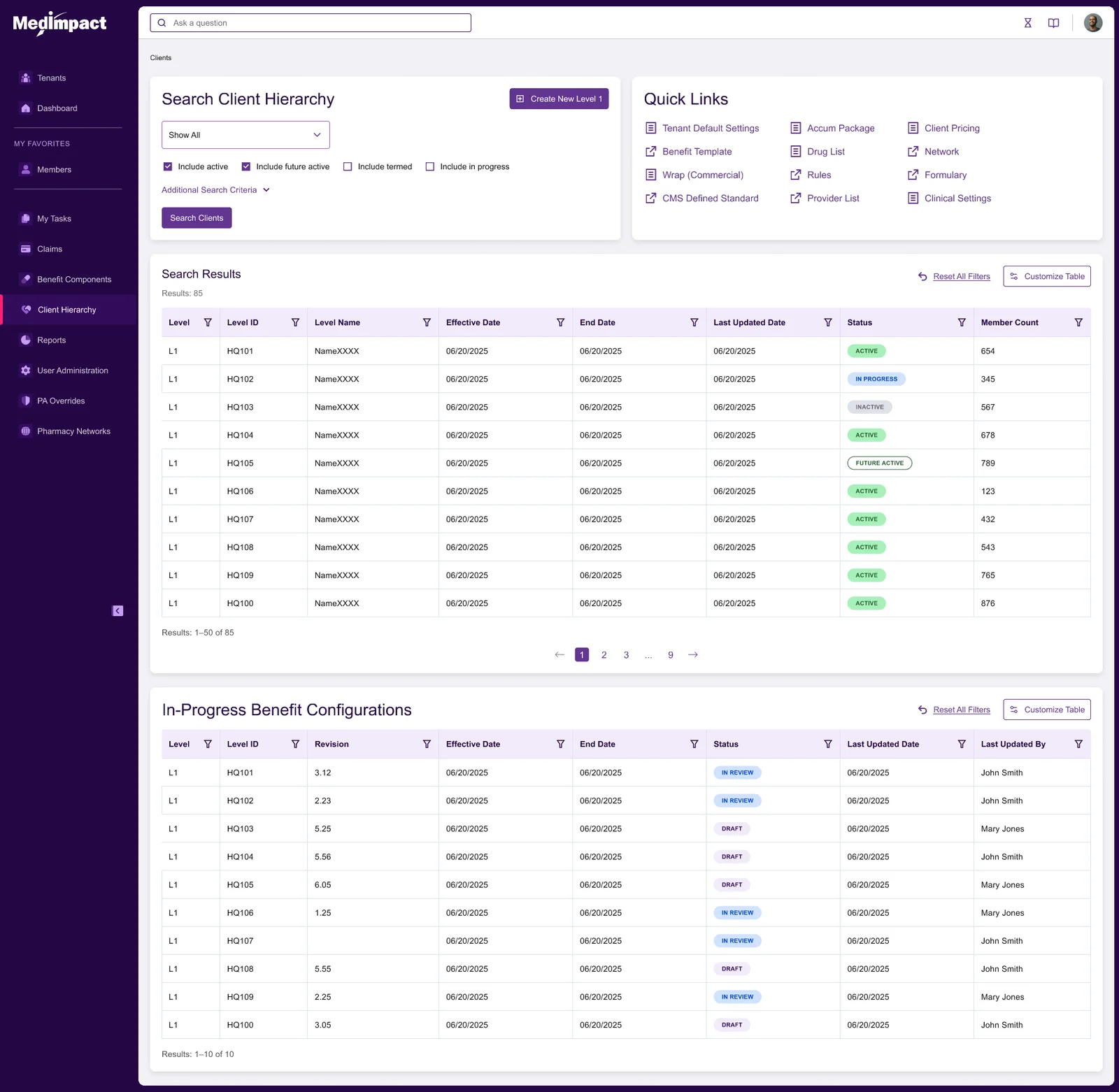
Benefit components landing page: a client hierarchy search beside a quick-links panel of benefit components, above a results table and a list of in-progress benefit configurations.
LandingThe components landing page. Search on the left, direct quick links to every reusable component on the right, then results and in-progress work below. This screen is the outcome of a review that split one overloaded navigation item in two — one route for client administration, one for component work — after stakeholders pointed out the combined page served neither job well.
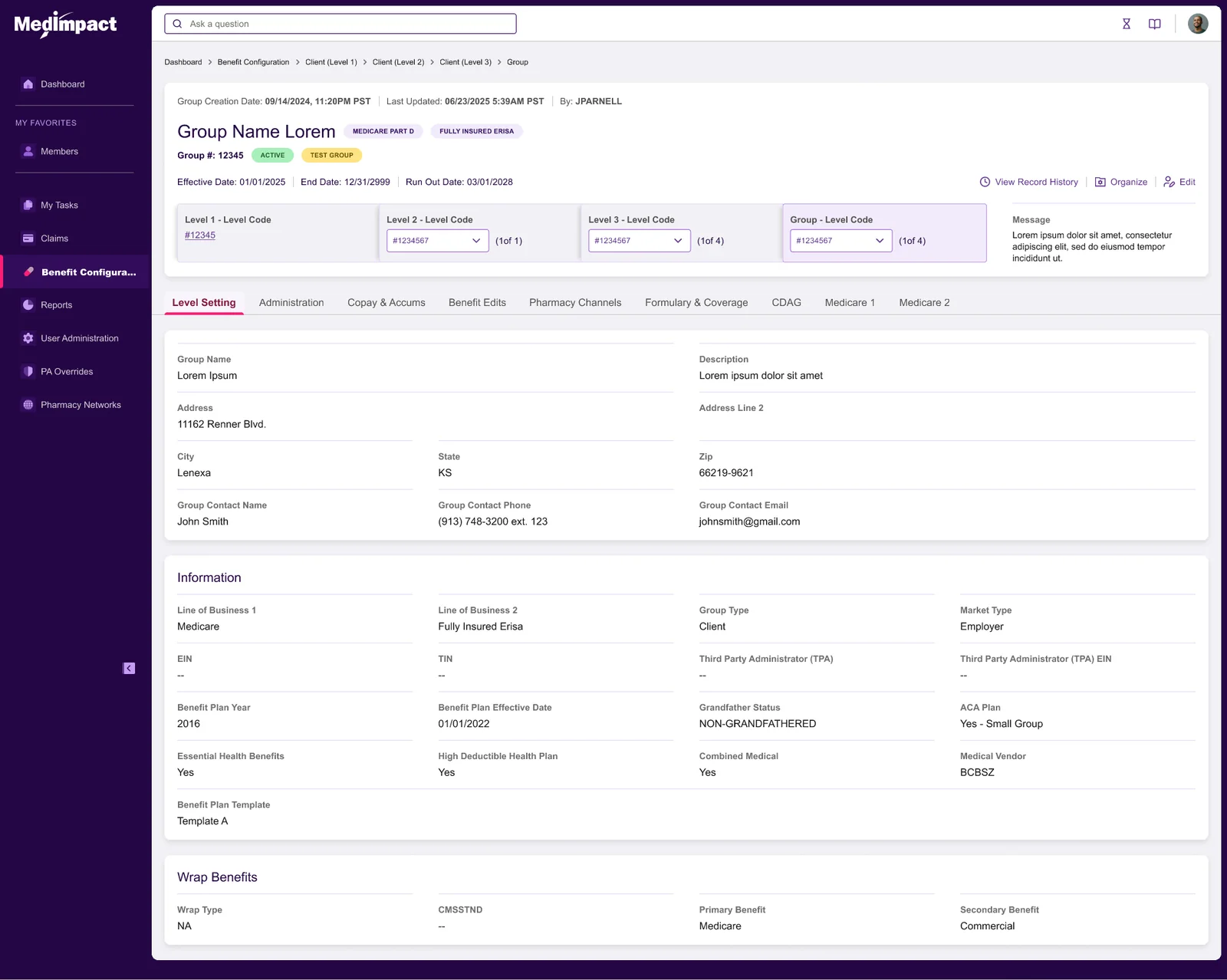
Group benefit detail screen showing a row of level cards for Level 1, Level 2, Level 3 and the group itself, above a tabbed configuration area.
InheritanceA group benefit, with the levels above it laid across the top as cards. This is the provenance problem solved visually: the chain a value travelled down is on screen before you touch anything, so changing a setting here is an informed decision rather than a guess.
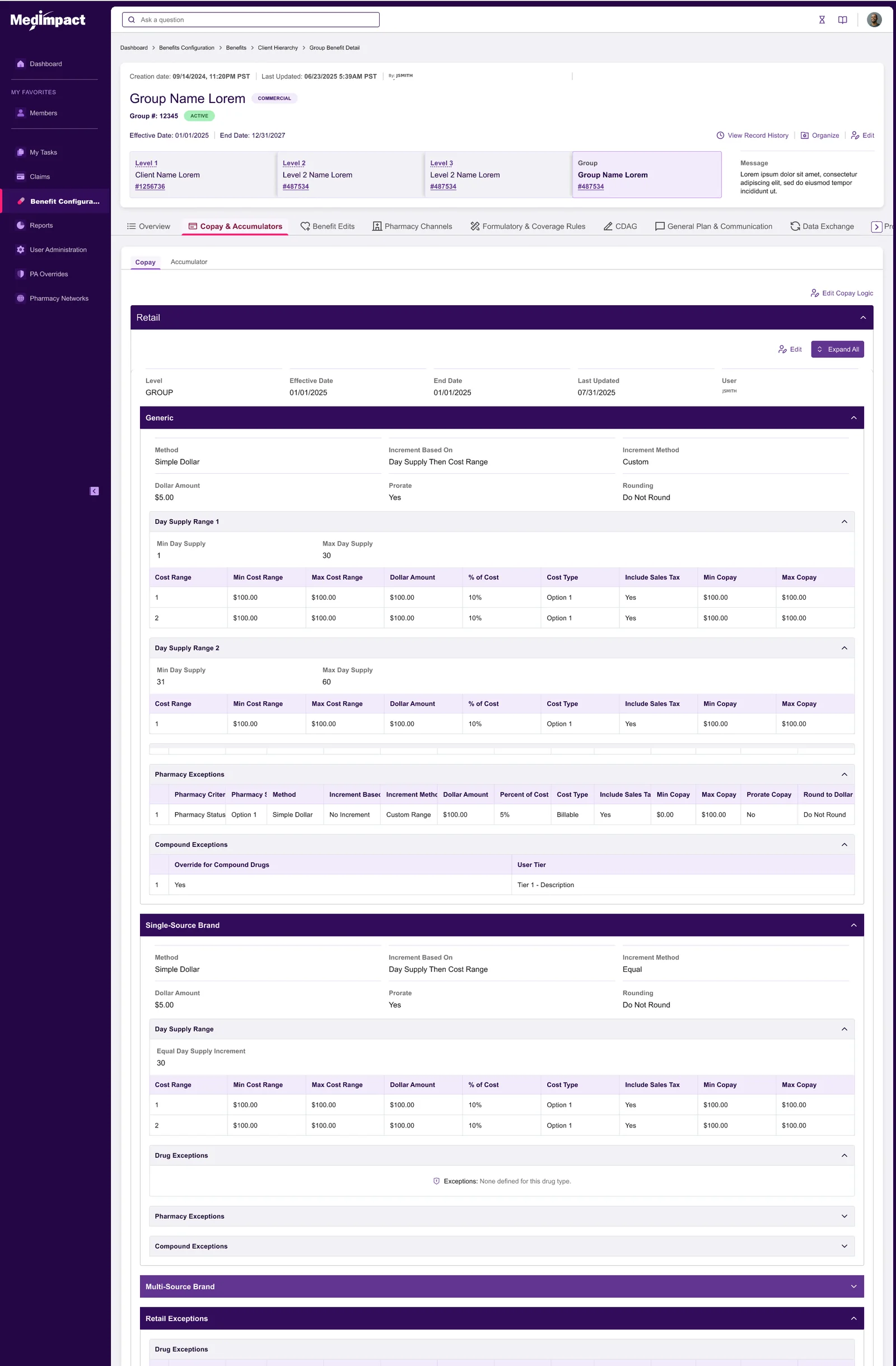
Full copay configuration screen: retail section with generic, single-source brand and multi-source brand panels, each containing day-supply ranges, cost-range tables, pharmacy exceptions and compound exceptions.
DepthOne tab of one benefit, shown full length. Cost rules vary by drug type, day supply, cost range, pharmacy channel and individual pharmacy, with exception sets layered on top. The design job here was progressive disclosure under real pressure — collapsing sections so the common case is short while the complex case stays reachable rather than hidden.
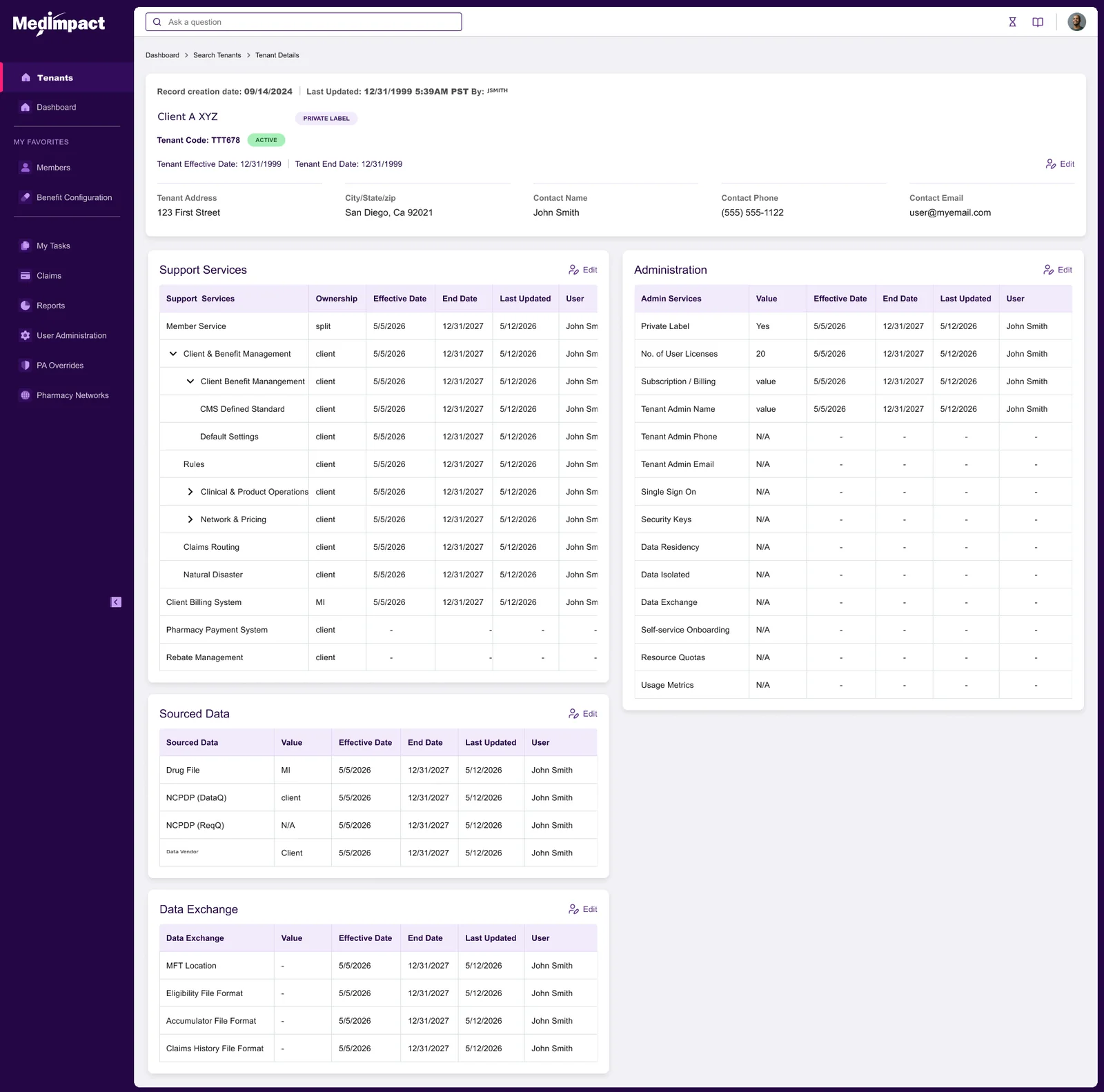
Organisation configuration screen with header details and tables for support services, administration, sourced data and data exchange, several rows expandable into sub-rows.
SetupOrganisation-level configuration, where an administering organisation’s services and defaults get established before any client work happens. Nested service rows expand in place, so the shape of what an organisation has switched on reads at a glance rather than across five screens.
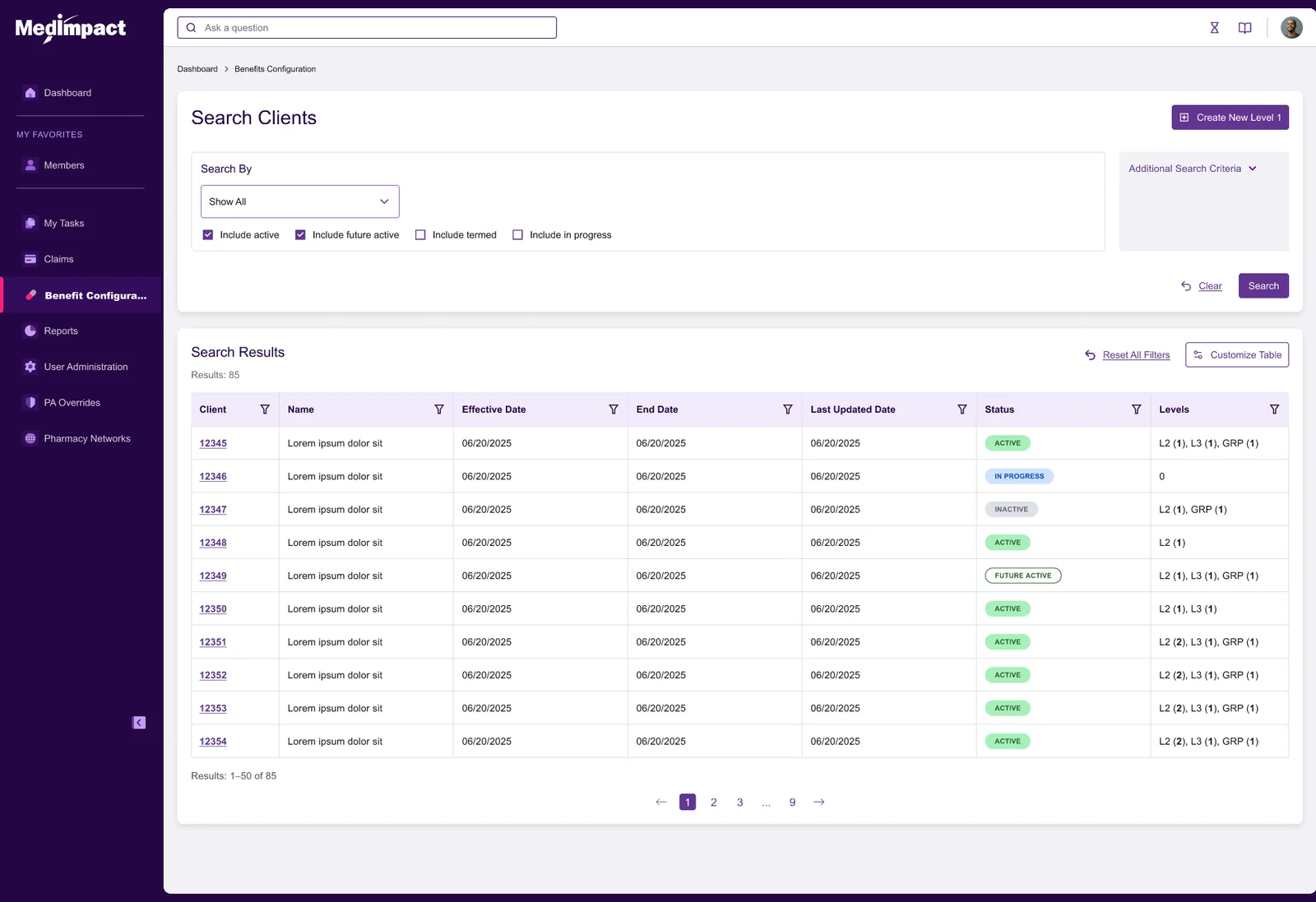
Client search landing page with search criteria, a customisable results table showing client numbers, dates, status badges and levels, and pagination.
VariantThe client-facing counterpart to the components landing page. Same pattern, different defaults — client results expanded on arrival, because this is where client administrators start their day and the component shortcuts are secondary for them.

The design system underneath

None of the above works without a governed component library. Built for this project, maintained as the single source of truth, and only changed when a pattern changes globally.

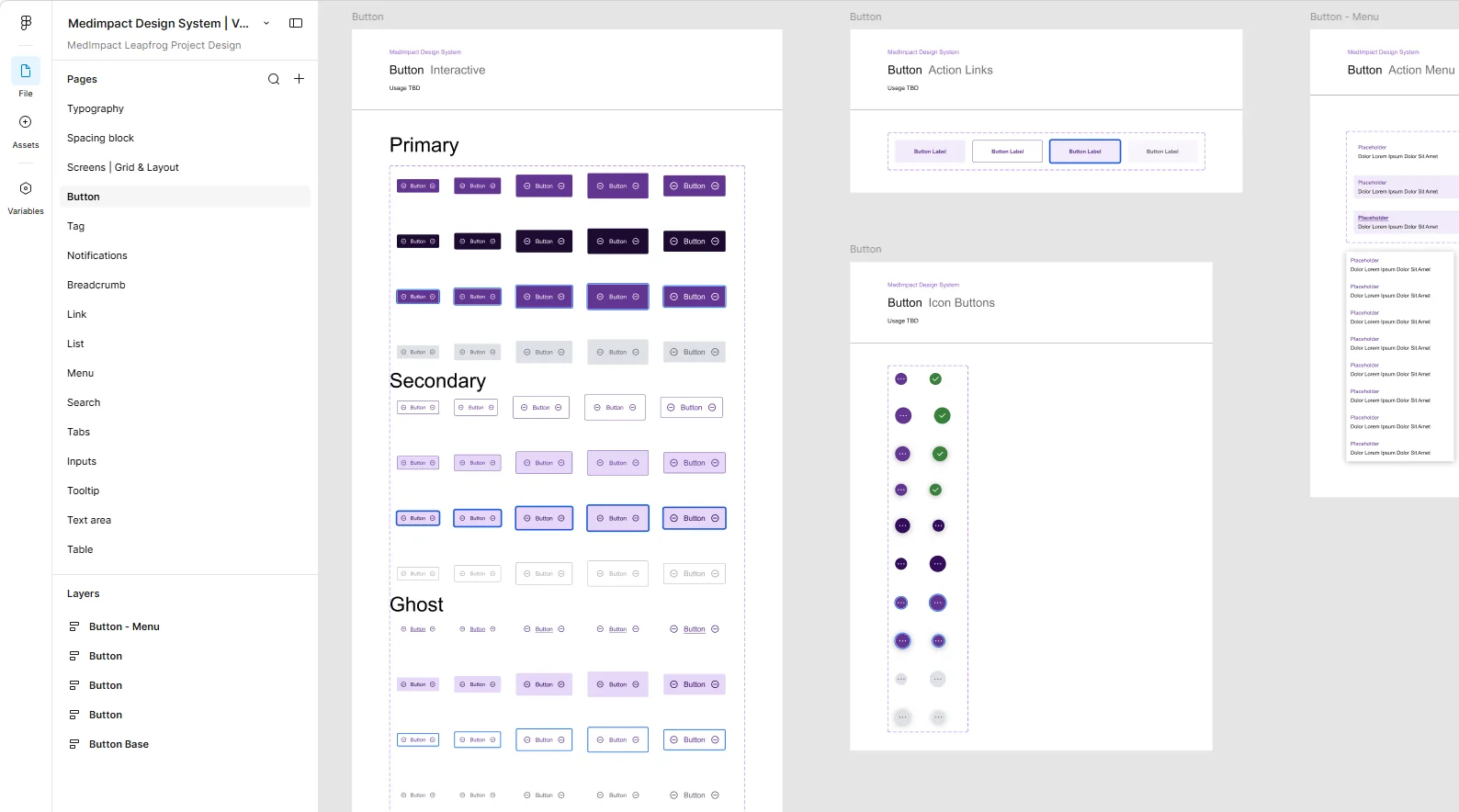
Design system file showing button variants: primary, secondary and ghost styles across multiple states, plus action links, icon buttons and action menus.
ComponentsSixteen component families — typography, spacing, grid, buttons, tags, notifications, breadcrumbs, links, lists, menus, search, tabs, inputs, tooltips, text areas and tables — each with its states enumerated rather than left to interpretation.
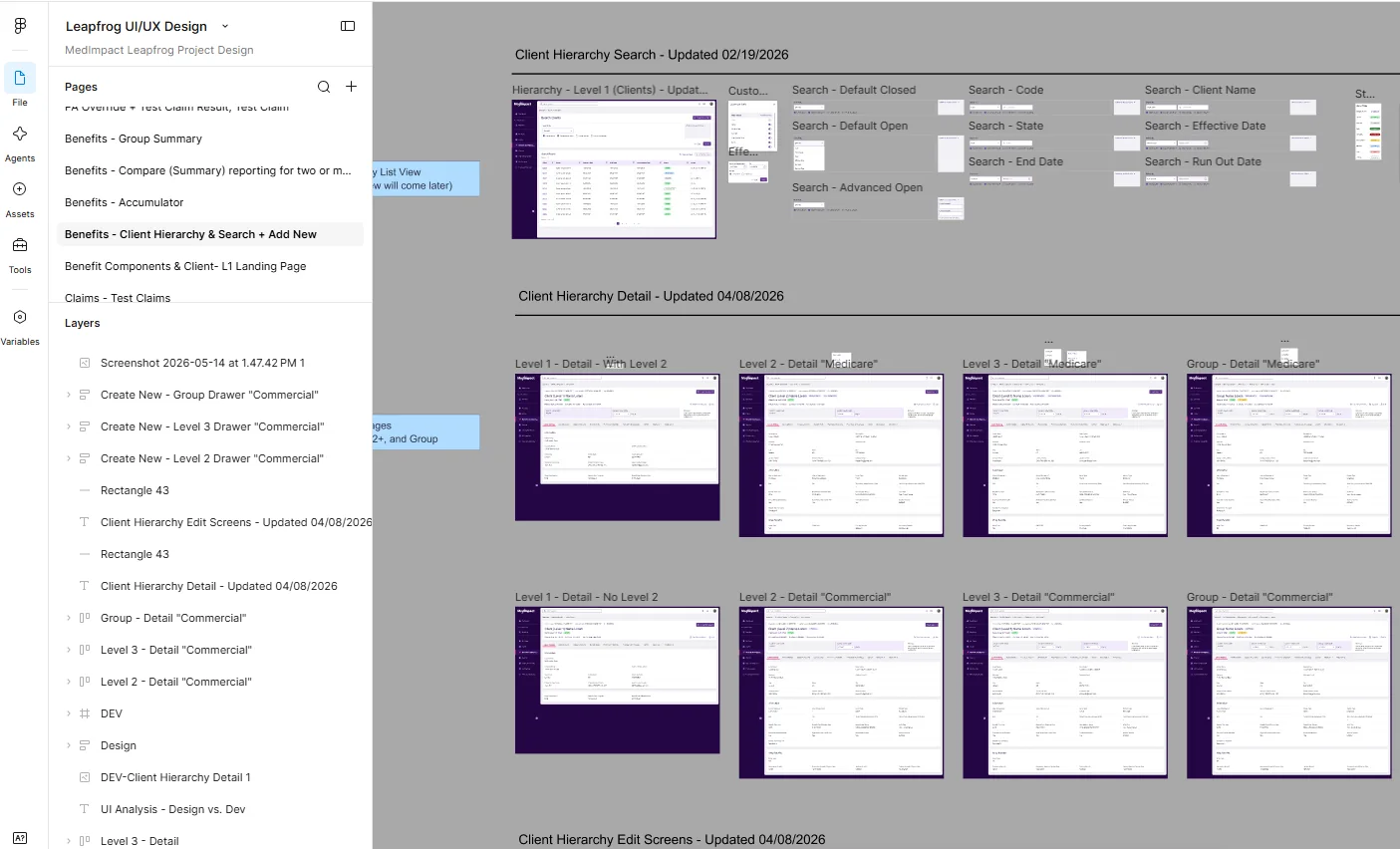
Figma canvas showing many hierarchy screens arranged in labelled groups with annotations, alongside a page list in the sidebar.
Working fileThe actual canvas, not a tidied export. Screens grouped by state, annotated in place, with dated iterations sitting beside one another. This is where the review comments land and where the next version gets argued out.

How AI was used, and where it wasn’t

This project is the counterweight to the seven-day conference build. Same designer, same year, opposite balance — because the work called for it.

Not for

the shipped screens

Every screen that reached engineering was built by hand in Figma against the governed component library. On a multi-year platform where components get reused across hundreds of configurations, the component is the product. Generating screens that merely look right would have produced a library nobody could maintain.

Used

for competitive gap analysis

Requirements run against what comparable platforms actually offer, to find the gaps worth building into. That analysis did two jobs: it sharpened the product vision, and it sequenced the roadmap — what ships first, what follows, and why.

Used

for research synthesis

Refining user requirements and personas against a real user base, and pressure-testing them into workflows and journey maps. It also produced fast throwaway concepts during ideation on two modules — used to settle a direction, then rebuilt by hand rather than carried into the prototype.

Knowing which of these two projects called for which approach is the actual skill. Either method applied to the wrong problem produces something that looks finished and is not.

How it actually got made

Not one design phase. A repeating cycle, run per release, with the same gates every time.

Per release

The cycle

Each module ran the full loop before anything reached engineering.

  • Requirements, refined against users. Written requirements gathered from subject-matter interviews, then checked against personas built from the real user base rather than invented ones — and mapped into workflows and journey swimlanes so gaps surfaced as missing steps instead of opinions.
  • Ideation and wireframes. Structure argued out at low fidelity first, where changing it is cheap.
  • Interactive prototypes. Built in Figma from the component library, not mocked — so reviewers reacted to something that behaved rather than something that looked.
  • User review and testing rounds. Multiple passes per module, with findings written up rather than left in a meeting. Open questions stayed visibly open on the artifacts until somebody closed them.
  • Refine, then re-test. Requirements updated from what testing found, prototype updated, round repeated until the open list was empty.
  • Dev-ready, and gated. “Done” meant the prototype was ready for inspection in dev mode and both the product and business-architecture leads had signed off. Not one person’s call, and not a date on a plan.
Scope got cut at these gates too. One proposal for fully configurable per-role landing pages was deliberately deferred rather than built, because the development cost outweighed what it bought in the first release. Deciding what not to design is part of the job.

Where it stands

In flight. Several modules are complete and released; others are scheduled through the remaining phases of the programme.

Released in sequence, on purpose. Client and member pages with a dashboard first, because that is where every user starts. Benefit overview some months later. Then organisation-level configuration and cost-share. Each one benchmarked and scheduled rather than shipped when it happened to be ready.

What it demonstrates. Enterprise product design at platform scale — hierarchy, inheritance, reusable components, role-shaped variants, a governed design system, and the review discipline to get all of it approved by people who have to live with it.

Enterprise platform UXDesign systemsInformation architectureFigma prototypingResearch synthesisRelease planning
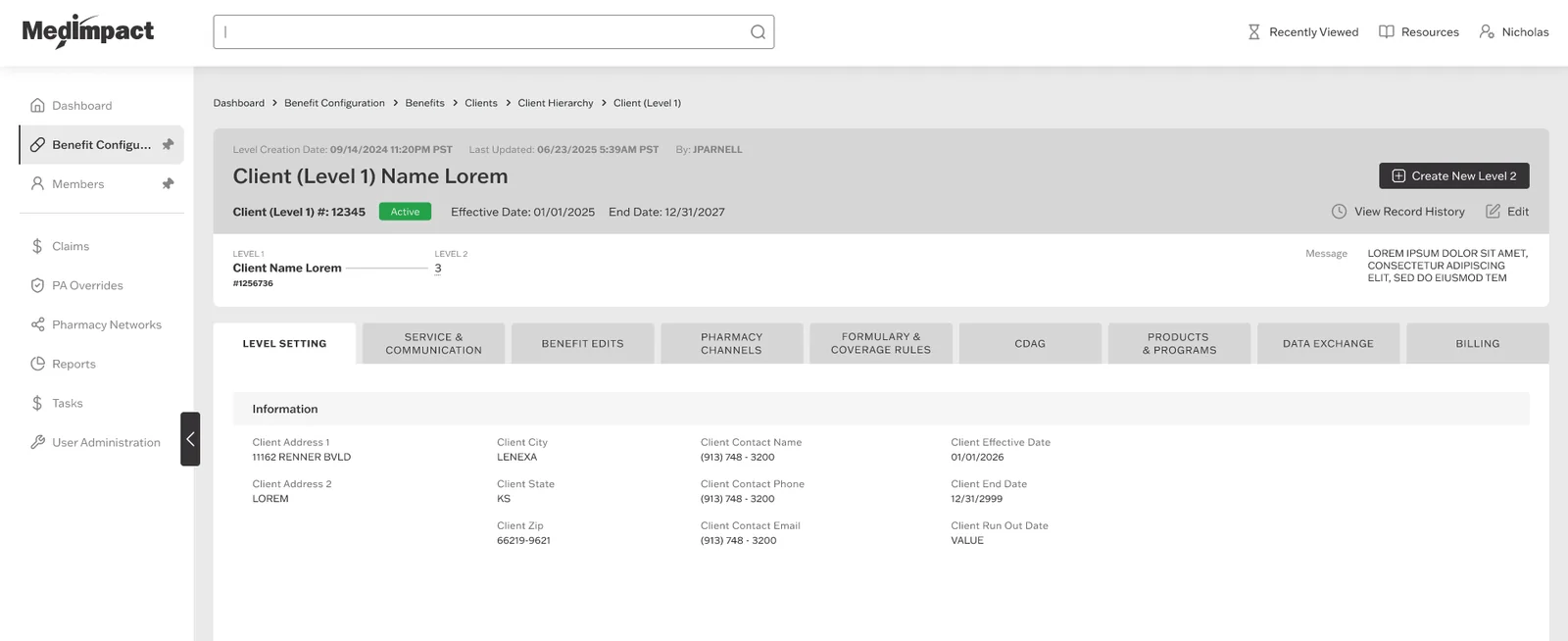
Client detail page showing client identification, status, and a horizontal row of configuration category tabs.
ClientA client record with its configuration categories across the top.

If this sounds like your product

Platform work of this shape has a few things in common wherever it happens.

The hierarchy

is the hard part

If your product has inheritance, the interface problem is almost never the form. It is showing people what a value is, where it came from, and what changing it will reach. Solve that and most of the rest follows.

The component library

is the product

On a platform reused across many configurations, the reusable parts are the thing you are actually building. A design system is not decoration on top — it is the only reason the twentieth screen costs less than the first.

Sequencing

is a design decision

What ships first determines what everything after it has to live with. Deciding that from analysis rather than from whoever asked loudest is part of the design work, not a project-management afterthought.